vExpert: So What the Fuss

vExpert

“So What the Fuss” is not just a Stevie Wonder song, it is also what many people are thinking about the vExpert announcement. This past Thursday, VMware announced the selected vExperts for 2015.

What is vExpert?

Let’s start with what is not. A lot of people think of it as the highest cert available from VMware, and confuse it with the VCDX certification. Well, it is not. Although some VCDXs are vExperts, not all vExperts are VCDXs. A vExpert is an individual that is passionate about his/her job and cares enough to share knowledge with others without compensation. People become a vExpert based on their quantitative and qualitative contribution to the community, not by taking a test; therefore, vExpert is not a certification.

What’s in it for me?

This program not only helps VMware get the word out about their products, but it also helps aspiring vExperts push the limits and dig down into the technology and capabilities. This not only benefits the individual’s knowledge base, but also his/her employer. For those of us that are customers, the employers win by having the best infrastructure they can have. For vendors/consultants, it makes their jobs easier. For start-ups, well, this should be required, IMHO.

So What the Fuss?

So, what is the big deal? Well, it is a big deal in my opinion. Individuals spent countless hours of their personal time, including nights, weekends, and being away from family in order to contribute to the community. So, to be recognized by VMware, is a nice pat on the back for those of us that make the sacrifice. VMware has a great community and a great program led by Corey Romero and his team, so thanks to them for the all the great work they do. I am humbled and honored to be named a vExpert once again.
vSphere 6 Availability Enhancements

With the introduction of vSphere 6, many new enhancements have been introduced. Given that IT is primarily delivered as a service within a business, the availability of our environment is often high priority. This new version of vSphere introduces the following enhancements:

  • Better vMotion Capabilities
  • Multi-Processor Fault Tolerance (FT) (up to 4 vCPUs)
  • App HA now supports more applications
  • vSphere Replication has better RPO (15 minutes) and scalability (2000 VMs)

There are other availability enhancements in vSphere 6, but the previous list really called my attention. Specifically the vMotion capabilities. In previous versions, moving VMs between vCenters was a little cumbersome and required a lot of manual intervention such as scripts or even down time. Such capability is now possible with vSphere where VMs can be moved not only across datacenters, but also across long distances (greater than 100ms round trip time. It is now possible to perform vMotion tasks across virtual switches. However, it is important to understand that the vCenters have to be part of the same SSO domain for this to work.

What does all this mean to me? Well, in my opinion, these enhancements can be extremely handy for disaster prevention exercises. Take a scenario where there is an advanced notice about a hurricane, or flood. Let’s assume that that a stretched VLAN or VXLAN has been configured across 2 data centers with a reasonable rtt (about 100 ms or less). In this case, the option exists to move some powered-on VMs to another vCenter within the same subnet in order to prevent down time for the business. Of course, this can also be accomplished by SRM if already implemented.

These enhancements as well as the ones in the network, managements, and storage realms makes vSphere 6 impossible to ignore, and set VMware apart from its competitors.

vSphere 6 Web Client: Yes, Let’s go there…

Since the introduction of vSphere 5.1, VMware introduced the new Web Client. Yes, there was another web client out there, but it was not widely used. A lot of people questioned the change towards a web interface, so here are many reasons for the Web Client:

  • Access from any device with Web access
  • No need to install binaries in multiple locations to access the vSphere environment
  • Multi OS friendly
  • Scalable solution
  • API friendly

This first version was well received by many, but others noticed some slow response within the browsers. Well, I am happy to say that the new Web Client in vSphere is anything but slow. I know for a fact that the VMware team has spent countless hours working to get the slow response issue resolved. I was privileged to be part of a private customer Alpha test for vSphere x.y , and the difference made since the Alpha up until Beta 2 has been tremendous. I had the chance to voice concerns in many areas and obviously the Web Client was one of them, and let me tell you, VMware listens very well and does whatever needs to be done to make customers happy.

I will list some of the changes to the Web Client that I believe most customers will REALLY like.

  • Fast response times for Web Client interaction
    • Very noticeable
  • Faster log on process
  • Browser Friendly
    • Previous version had best results using Google Chrome
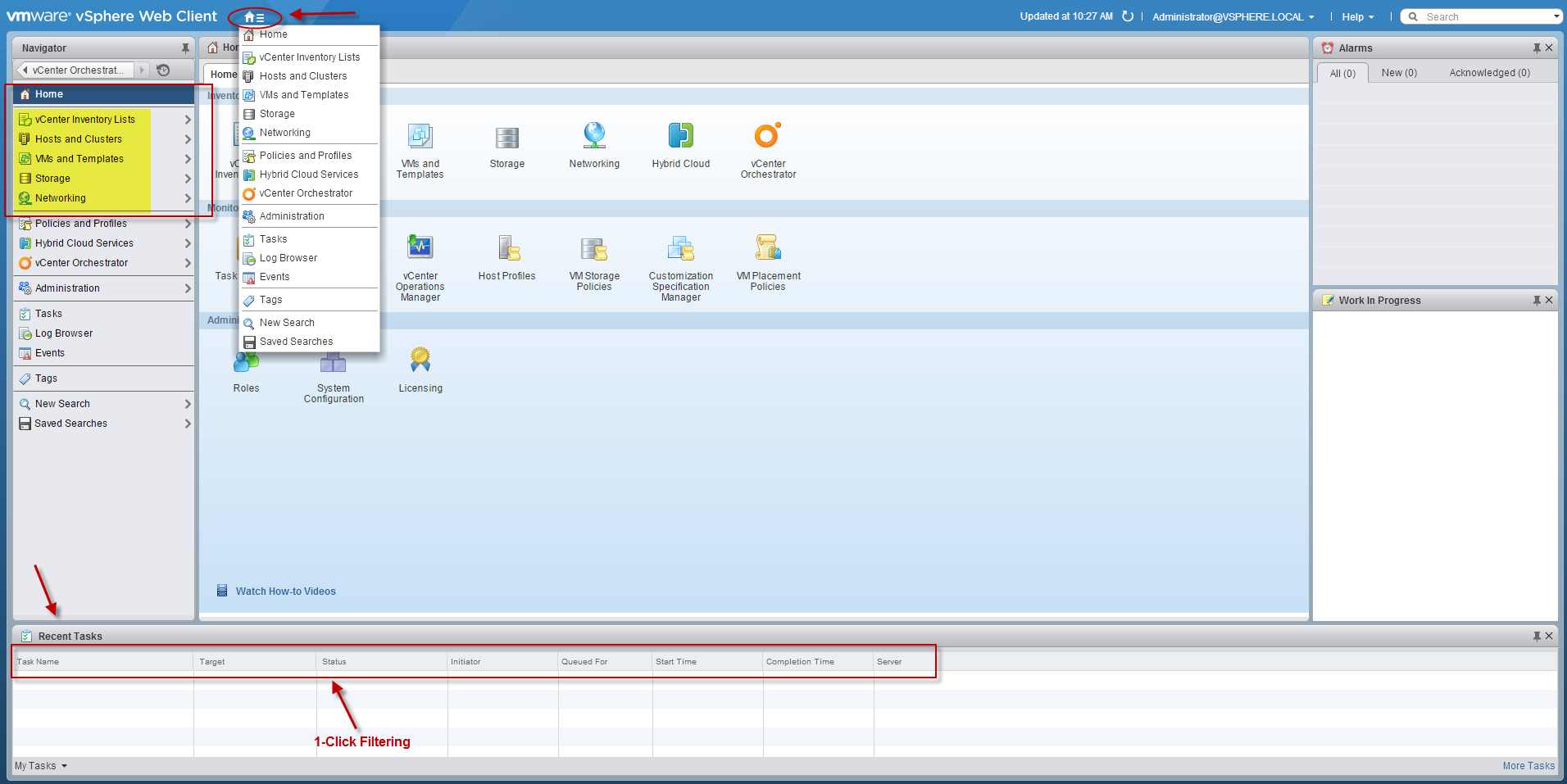
  • Recent Tasks (at bottom) is back
  • Drop down menu from home icon for easy, 1-click navigation
  • Core items added to left pane (Networking, Storage, VMs, Hosts)
  • vCenter Inventory Lists
  • 1-click task filtering


These are some of many improvements in the new vSphere release that will satisfy the requests of many customers. I was extremely impressed about the speed of the Web Client, but the additional features are icing on the cake.

As you may infer, the “fat client” will play a small to non-existent role moving forward. The C# client may still be used to access the individual hosts, as well as having read only capabilities for objects with virtual hardware version 9 and above, but vCenter tasks will be have to be done through the new an improved Web Client. Based on the huge improvements and new features, I don’t think many people will miss the old client.

Web_Client

VVols: All Systems Go

After a long wait and development/marketing effort from VMware, VVols are finally ready to take over your datacenter(s).

VVols are the next generation, integration between vSphere and storage arrays. VVols leverage a new set of APIs (VASA) that allows vSphere to communicate with the array and provide additional features at the VM level. VVols are based on storage policies, which in turn allows for further automation between products.

This storage abstraction provided by VVols, allows for the control of storage, not only at the VM level but also at the VDMK level. This is a great feature, as now you can control VMDKs as separate entities. The connections between the hosts and VVols are done through an abstraction layer known as Protocol Endpoints, which provides the user the freedom to use several protocols at once such as FC, iSCSI, or NFS.

There are a few requirements for VVols. One of them is that the array vendor can support VVols. The APIs from the vendor (VASA), as well as other vendor requirements. In the case of a storage array vendor such as NetApp, VSC is also required.

The Policy-Based Provisioning provided by VVols brings us even closer to the Software Defined Data Center (SDDC)


VVOLS

VMware vROps: Monitoring Solutions for NetApp Storage

VMware’s vRealize Operations Manager is a great tool for monitoring not only your VMware environment but also the underlying components utilized by this virtualization solution. vROps has the ability to incorporate many other solutions, in order to provide what most IT departments search for; a single point to monitor the environment.

As the Software Defined Data Center (SDDC) begins to take over, it is more evident that the main components that comprise IT infrastructures include virtualization of servers and network, as well as storage. Monitoring such technologies can be cumbersome and may require many tools, unless we leverage vROps management packs. I have utilized other tools such as native vendor tools, tools that offer management packs as well, but I have not been able to find the granularity that I need to monitor a large environment, specially when it comes to graphical representation. A picture is worth a thousand words.

After installing vROps 6.0, I started to leverage its new features, but I wanted more. I searched for storage integration and luckily came across Blue Medora’s NetApp management pack for vROps. This management pack provides not only granular visibility to the storage arrays, but more importantly how those arrays, volumes, and LUNs are associated with the VMware environment. This solution also allows for the familiar vROps drill down of information in order to aid in the troubleshooting process. This and many other solutions can be found at VSX site (VMware Solutions Exchange) https://solutionexchange.vmware.com/store.

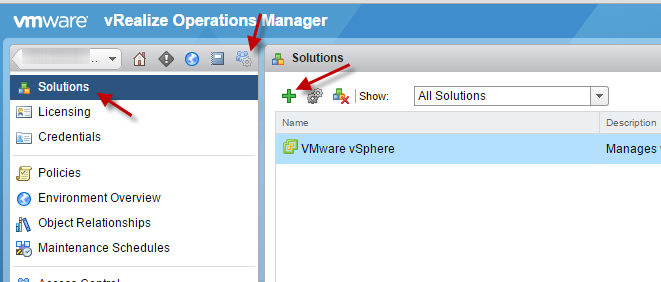
The installation of the Blue Medora pack is very simple and straight forward, as long as you meet all the requirements. The most obvious requirements include VMware’s vROps and NetApp’s OnCommand Unified Manager Core (DFM), which acts as a proxy between vROps and the NetApp arrays to obtain information. As previously mentioned, you can obtain the management pack from VSX or Blue Medora’s site for a 30 day free trial. After obtaining the pack, add this to your vROpS solutions and configure.

Solutions.

NetApp_Adapter

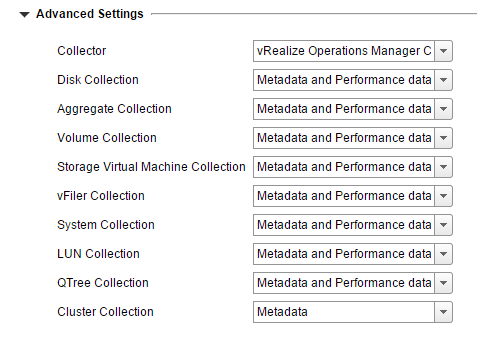
You can also tune what and how much to collect depending on the entity, by expanding the advanced settings during configuration. These settings can be changed after deployment as well.

NetApp_AdvancedSettings


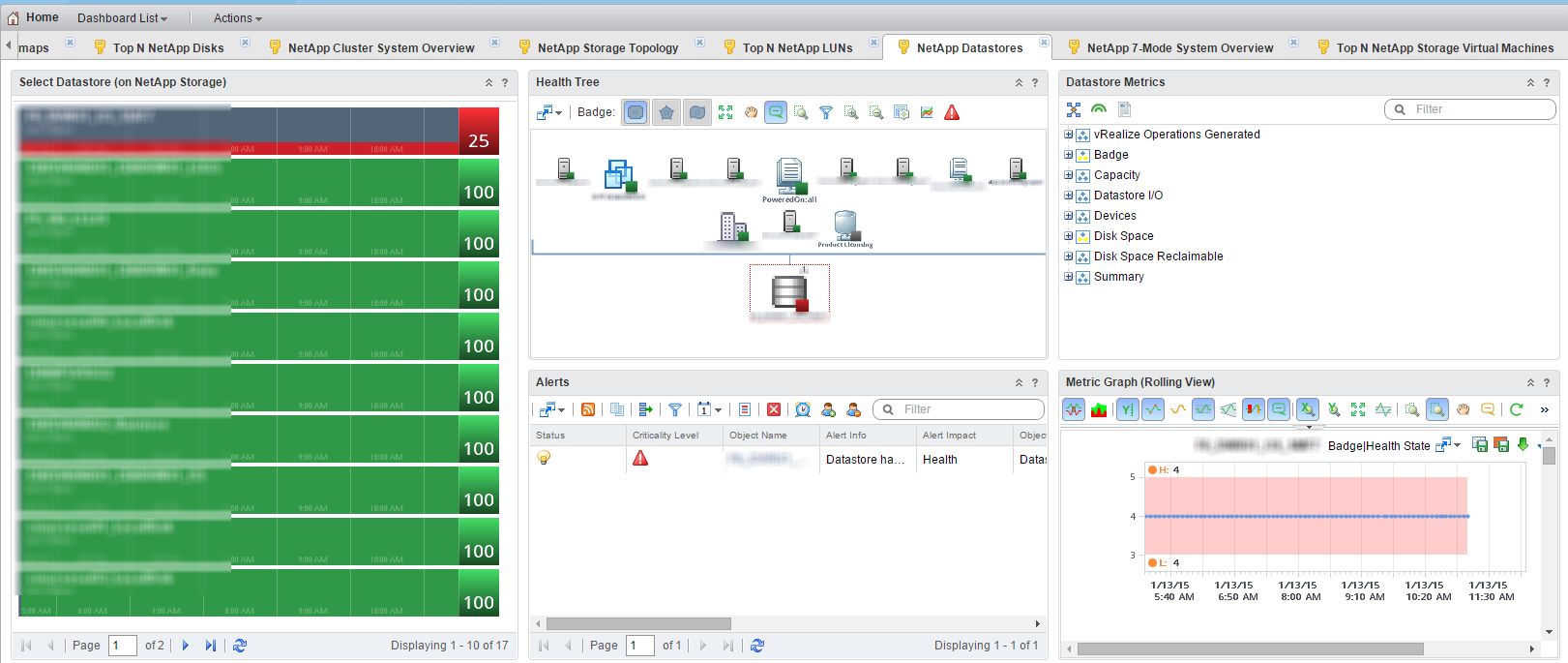
That is pretty much it. After a successful deployment, you will notice about a dozen new dashboards on vROps’ home page.

NetApp_Dashboards


NetApp_Dashboards_Sample