cDOT Tips 101 – Web Logs

Troubleshoot

With the transition to NetApp clustered Data ONTAP from 7-mode, a lot of end users are struggling not  only with new commands to learn, but also with troubleshooting a platform that admins are not familiar  with.

The most common mistake I see from admins, specially the newbies, is the lack of research and effort put  into a problem. Often times the problem is easy to fix, but you have to go find the root cause first.

While admins still stumble through the new commands, the first thing they should be doing during a troubleshooting exercise is to look for the logs. This may be obvious to some of us, but not to all. Fortunately cDOT allows for admins to look through the logs from a web UI as long as everything is configured properly, which removes some of the intimidation from new commands.

To access the logs for a node, you first need to:

  • setup a cluster management LIF
  • configure web protocol engine (HTTP or HTTPS (need certs))
  • allow chosen protocol through the firewall, if enabled
  • setup Service Processor Infrastructure (spi)
    • you can use vserver services web show to verify if it is enabled
  • cluster user account must be enabled for http access
  • access to the spi web service must be in place for your role (access-control)

Once everything is configured properly, you can navigate to:

Note: If you selected to use HTTPS and configured/imported certificates, the path will start with https instead of http as shown above.

If asked for credentials, use the credentials for the cluster user account.

web_log

VCSA 6.0 OVA install

In my last post I talked about some of the gaps with VCSA compared to the Windows vCenter version. I mentioned that the OVA was no longer available for download; however, it was quickly pointed out to me by William Lam from VMware that the OVA is in fact still available within the download; however, there is a disclaimer stating that such method is not officially supported by VMware.

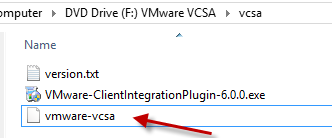
Anyway, the OVA is buried within the ISO. Once you have mounted the ISO, you can navigate to the vcsa folder and the file named vmware-vcsa (with no extension) is the actual OVA (ISO->vcsa->vmware-vcsa). You may need to rename the ova to vmware-vcsa.ova or <other>.ova.

vcsa_ovaFile OVA_VCSA


From that point on, the deployment is the same as before.

William works for VMware and is a super sharp guy; although he may not remember me, I had the pleasure of meeting him during the vSphere 6 onsite Alpha over a year ago. Make sure to check out his blog full of tips and tricks. His blog site is virtuallyGhetto .

Deploying VCSA 6.0: Mind the Gap

VMware’s VCSA 6.0 brings a lot of enhancements compared to previous versions. I would seriously consider deploying VCSA in a production environment in order to replace the Windows flavor. For those not familiar with VCSA, this is the virtual appliance option to deploy vCenter in an environment. It reduces the time needed to deploy vCenter and offers an integrated database for no additional cost. Although this post may not be entirely technical, it will allow you to be aware of possible constraints that will prevent you from deploying VCSA before you invest too much time on it.

One of the great things about deploying VCSA over the Windows vCenter is that you will reduce the cost by not deploying a Windows VM as well as having to purchase an MSSQL license. VCSA sounds great so far, but there are some gaps that you need to be aware of before deploying this in an environment.


VCSA_mind_the_gap

Some of the shortcomings of VCSA are primarily related to its nature of not being a Windows VM. For some deployments Windows vCenters have been used to also host the VUM (Update Manager) components, as well as programs that provide additional capabilities to the virtual environment such as VSC for NetApp storage, among others. This means that you would still need to deploy a Windows VM to host VUM as well as VSC in this case. Even though you would still be deploying such VM, the need for a MSSQL server/instance is not required which translates in savings.

Another aspect to keep in mind is the installation and migration from previous versions. There is no in-place upgrade from previous versions, but migrations are possible. With this in mind, you may want to consider to just start with a new, fresh environment. I would. Same applies to the Windows flavor. The installation method now comes as an ISO image. This may cause some confusion. In order to deploy VCSA, the ISO is mounted from a Windows system (can be your computer) and installation can be done remotely.

Before installation, make sure you install the Client Integration Plugin located within the ISO under the vcsa folder.

VCSA_CIP


Start the installation by launching the vcsa-setup.html file from the ISO. A Web UI opens up after a few seconds, and gives you the option to install and ‘Upgrade” (migrate). During installation, just provide the target Host information, and the rest of the information needed for the installation. Make sure the VCSA appliance has a proper network connection and you can reach it from the computer deploying the appliance.

vcsa_setupvcsa_UI


Both Windows and appliance vCenter offerings have the same scalability numbers as it relates to hosts, VMs, clusters, etc.

In conclusion, VCSA is a great choice for vCenter, but just be aware of some of the constraints of not using the Windows option. By the way the Web UI in vSphere 6 is soooo much faster!!! I’m just saying.


NetApp EVO:RAIL

EVO:RAIL LogoFor those not familiar with EVO:RAIL, this is a great solution from VMware that offers a hyperconverged infrastructure with easy management by leveraging software solutions such as vSphere, vCenter, VSAN and log insight. This solution seems to have the attention of many customers as deployment, and administration are greatly simplified and does not require a high level engineer to maintain the environment.

Although the announcement that NetApp would be launching a hyperconverged EVO:RAIL solution was made late last year, the product has not yet been released to the public (as far as I know). So there are a lot of questions out there. Is it FAS? Is it EVO:RAIL? or a combination? Well, the answer is both and more.

This is a NetApp integrated EVO:RAIL solution that includes both EVO and the NetApp C-DOT we currently know. This offering allows low level admins to administer VMware and NetApp from the same console via VSC. More on VSC, VASA and VAAI here. So in essence, when you get the NetApp 4RU appliance, you use a simple GUI wizard that automatically configures NetApp C-DOT and presents the storage to VMware. So this solution not only virtualizes the compute side but also the storage side.

Being that you have NetApp integrated into this solution, you are still able to use different protocols as well as SAN and NAS offerings, just like we do now with other FAS systems. This solution also includes automated back-up and recovery features, QoS, and Cloud integration by leveraging NetApp Data Fabric.


NetApp EVO:RAIL
NetApp EVO:RAIL

So, Why did NetApp decide to jump on the EVO:RAIL bandwagon???

Well, I believe that NetApp recognizes the competition with new storage vendors such as SolidFire, Tintri, and Simplivity among others, that offer all flash, high performance, easy to use hyperconverged solutions. Also NetApp recognizes the need for a solution for small and medium size businesses that do not have the luxury of hiring several IT staff to manage different areas of IT. Lastly, I believe NetApp is recognizing that in order to survive, they need diversify, as the days of shared enterprise storage may be coming to an end by the introduction of new technologies that drive costs down and simplifies administration while reducing overhead.


Uses Cases:

NetApp seems to be targeting departments and business areas for this specific solution. In my opinion EVO:RAIL (not just NetApp’s) has many other uses cases such as VDI deployments, production loads for remote offices in different geo-locations, test/dev, as well as DR source/target when combined with a Cloud offering.

I’m curious to see what the final product would be like, and how it would stand against other EVO:RAIL offerings.


TIPS: Explain the Cloud to your Boss

littlecloud.svg

I am calling this article “TIPS” hoping it serves a dual purpose. On one instance, it should help you understand what the cloud is from a high level view if you are still fuzzy about the subject, but it will also remind you of the Techniques to Inform, Present and Show (TIPS) details about the cloud.

I recently completed my Masters degree in Cyber Security, and just so happened that I did my research paper (Thesis) on the cloud. I thought this would be an easy topic since I knew everything about cloud computing, so I thought. As I dug deeper, I found interesting aspects, vulnerabilities, compliance advantages and disadvantages, but also some use cases where the cloud was a perfect fit, and some where it did not.

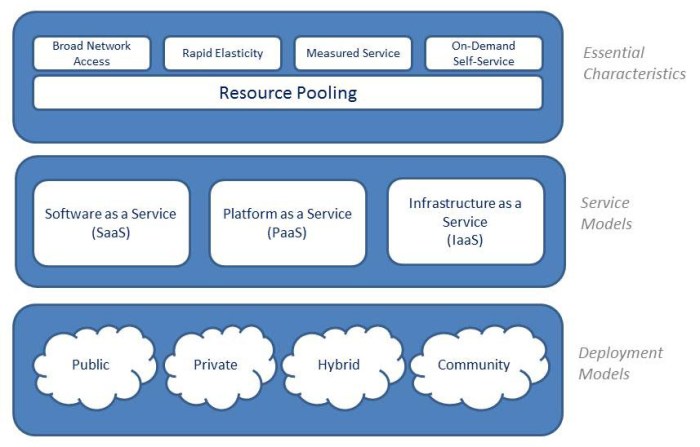
So, the cloud is not a new concept, as it has been around for quite some time. Cloud computing is the convergence of resources that allows for a centralized location of shared resources that can be deployed quickly as needed. This methodology has been in place for many years. What has changed is the location, availability, accessibility and pricing, which is what executives care the most about in most instances. There are 4 types of cloud, also known as Deployment Models:

  • Private – On Premise
  • Public – Hosted by a service provider
  • Hybrid – Combination of Public/Private
  • Community – Cloud composed of organizations in the same field or common interests that drives a requirement. For example, a group of hospitals the require a cloud service provider to be HIPAA compliant.

cloudtypes

Aside from the Deployment Models of Cloud Computing, we also have service models. Although you may have heard many, many service models being offered, there are three official service models where different services may fall into. So, a vendor’s marketing strategies that create their own service models, is only causing confusion to potential users as well as delaying the adoption of the technology. There are three service models plus the highly utilized on premise option.

  • Private – On premise. All service models are available within a company’s data-center.
  • Software as a Service (SaaS) – Offers only software available through the internet. Think of it as your iTunes, or GMAIL.
  • Platform as a Service (PaaS) – Offers a platform where customer can develop, and run web applications without having to worry about servers, network, etc.
  • Infrastructure as a Service (IaaS) – This offering provides everything but the kitchen sink. It may include compute, storage, networking, management, security, hypervisors, etc.

cloudmodels


From a high level view. This is what the cloud is about. The term has gained interest in the last several years thanks to the advances in technology, and communications which allows for fast, scalable, and cost effective solutions to the business. Before you jump on the cloud band wagon, you should do your due diligence and investigate the pros and cons of cloud computing, especially as it relates to compliance, and security. I won’t go there, I promise.

To wrap things up, remember to follow TIPS. Use the Techniques such as the need to Inform yourself before you tell others, Present accurate information in a simplistic way, and Show the pros and cons of the solution, as well as a high level logical design highlighting the differences between the different offerings.
cloud-overview

Image source: rividium.com