For those that went to either NetApp Insight US or EMEA, the grafana UI used for the Neto’s wicked demo looks very familiar.
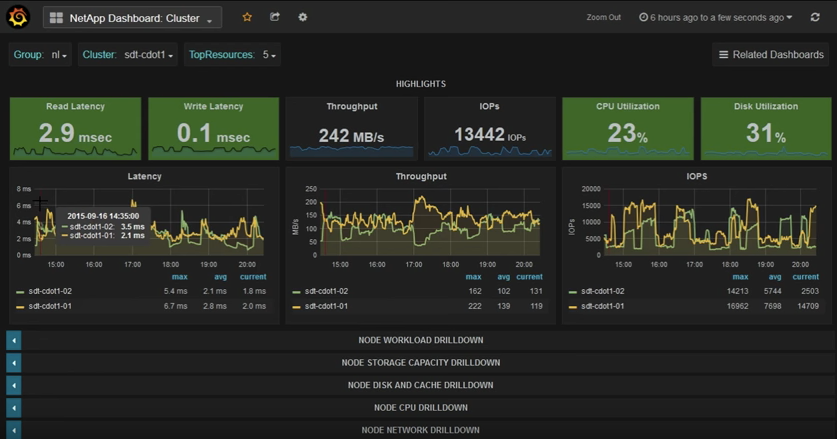
NetApp recently released a tool called Harvest, which extracts information from the ONTAP nodes/clusters as well as OnCommand Unified Manager (OCUM) and presents such information in a really cool dashboard. This advaced Performance Monitoring already includes pre-built metrics for both performance and capacity that will allow any NetApp admin to quickly look at many, many key aspects of the environment, and quickly discern whether or not there are any bottlenecks/issues.
I like to think of this tool as OCUM (OnCommand Unified Manager) in steroids, with a hint of OPM (OnCommand Performance Manager) (maybe the other way around) and a great UI. Instructions here. This tool is so cool, we are starting to offer this to our customers.
The complete solution is composed of NetApp’s Harvest tool, Graphite for DB and parsing and Grafana as the Web UI. Harvest is available to download from NetApp’s support page, and both Graphite and Grafana are open source (free).
Chris Madden (NetApp), has created a cool video about this solution, as well as step-by-step deployment instructions here.
A couple of weeks ago, NetApp’s conference (Insight) took place in Vegas. It took me a week to recuperate (Vegas) and absorb all the great content, so better late than never. While I am not new to IT conferences like VMworld, CiscoLive and Microsoft Ignite (TechEd) among others, this was my first NetApp Insight I was able to attend. I was on the customer side for 15 years, and when I jumped to the partner side, the conference was opened to customers.. it figures. The great thing is that everyone can go to Insight now. I can see why Insight was previously focused on partners, and employees, as NetApp’s conference is more technical than others in my humble opinion, and I love that.
As far as the content, there were a lot of cool technology announcements. I am happy to see that NetApp is innovating again. I can see how having to support both 7-mode and clustered-mode development was really taking a toll on producing new features, but that is now history. First thing that comes to mind was the expansion of SnapMirror. Now that is has been overhauled, according to the announcement, it will make it across all of NetApp’s products. This is huge, think of AltaVault, e-series, etc. all with SnapMirror. Speaking of SnapMirror, another up and coming release is SnapCenter which is the new Central Management interface for all SnapManager. YESS!! Finally. Like I said before, I was on the customer side for a very long time, and you know how tedious it is to have to manage tens or even hundreds of instances of SME, SMSQL, SMSP, SDW, etc.
Also part of the centralized management that we all love, Cloud ONTAP was demoed with OnCommand Cloud Manager. You can move your data between public clouds (AWS, Azure, etc.) with a quick drag-and-drop. In the demo, they literally clicked on an AWS cloud and dragged it into an Azure cloud, moving the data locality in seconds. This was a pretty awesome demo.
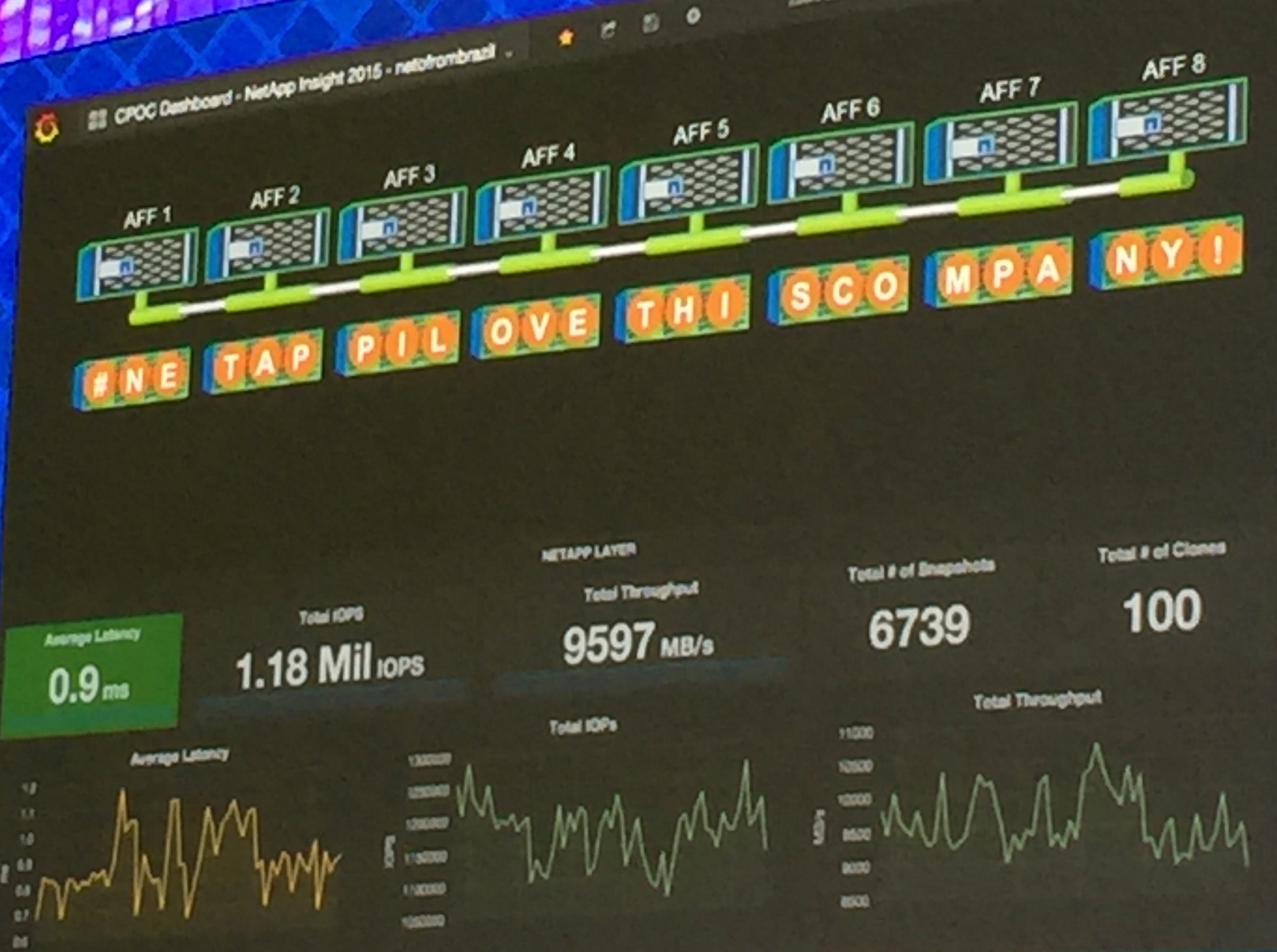
Earlier this year, NetApp announced their All Flash Array (AFA). Although many storage vendors came out with their version first, NetApp took its time to do it right. To prove it, they received outstanding results from SPC1 benchmark test, not only surpassing all of its competitors but also breaking records. So what did NetApp do to highlight this great accomplishment?!?! They made it better, faster, stronger. A demo by Neto From Brazil, demonstrated > 70% gains from previous results, achieving over 1.18M IOPS with UNDER 1ms latency with an 8-node AFF cluster. This is pretty amazing if you ask me.
Check out the demos in the video below
As always, check back later for new stuff in the IT realm…
For those of you that have watched this show (Drunk History), you either love it or hate. I love learning about history, specially when the narrators are drunk. It makes it very interesting and funny. Anyway, this blog post is not about the show, but about the history of storage breakthroughs that changed the way we do storage.
Anyway, there has been many technology advances that not only affected the storage realm, but also other software define solutions such as hypervisors. The birth of snapshots, array replication, cloning, etc are just some of the many advances that we now take for granted. Here is a good representation of the advances provided by NetApp for the last 30+ years.
When you are shopping for hardware, consider the slide above and ask yourself, what company has the most experience and are the pioneers in the field.
As you may or may have not heard the announcement earlier this week, NetApp has released an All Flash FAS (AFF) storage array. Many announcements, blogs and articles have been written about AFF, but I wanted to highlight the main aspects without having to read pages and pages (you can thank my ADHD for that).
Let me start ranting for a bit about those who have been spreading FUD about NetApp and how the company is “doomed”. I do not work for NetApp, but I use and truly believe that it is one of the best if not THE best storage solution in the market. Those who are writing negatively about NetApp still refer to it as a single purpose NAS, when it truly encompasses a diverse portfolio, and AFF is a perfect example.
What is the big deal about NetApp AFF?
The recent announcement highlights the marriage between FAS systems (ONTAP) and Flash. Yes, NetApp already has all flash systems such as the EF560, but such systems are not running on ONTAP.
ONTAP + Flash, results in the only storage solution that is truly unified and is capable of utilizing different protocols within the same software AND hardware, in addition to the incorporation of Flash. Yes, no need to buy separate hardware for NAS vs SAN protocols. When you add these two components together, AFF is the result of not only an all flash storage, but also incorporates all the features of ONTAP such as de-duplication, compression, built-in data protection. scale-out performance, multi-tenancy, Non disruptive upgrades, etc, etc, etc.
AFF Announcement Highlights
Here are some of the highlights about the recent AFF announcements:
Lowest price for All Flash storage ~$5/GB Raw
One SKU number
Includes ALL license Bundles (Yay!!!)
Locks in support price for years 4-7 (3 years included)
We are talking Flash here, so Flash wear is no longer a practical risk
High performance at low latency
In short, AFF promises to deliver Enterprise ready performance at low cost and low latency by leveraging Flash, and ONTAP 8.3.1 (later discussion).
For more information about NetApp AFF, follow my NetApp A-Team colleagues on twitter for excellent posts (#NetAppATeam)
As more and more hypervisors emerge in the market, and more features are added to current hypervisor offerings; businesses may opt to migrate between vendors to save money, add features, consolidate to a single platform, or simply to follow a strategic plan. The migration is costly, complex, time consuming and disruptive as it requires down time of the VMs to be migrated; which is often not an option.
If you use NetApp as your storage vendor, the solution for this problem is now available to you. NetApp has announced the release of OnCommand Shift; a tool that enables the migration between Hyper-V VMs into a VMware environment and vice versa. This conversion is automated and requires minimum intervention from the user, and it takes a fraction of the time that other tools would take otherwise. OnCommand Shift supports VMware ESX/ESXi 5.0 -> 6.0, and Microsoft Hyper-V 2008 R2 -> 2012 R2.
How does OnCommand Shift works?
OnCommand Shift utilizes NetApp’s FlexClone technology which allows for the creation of the target VM within seconds/minutes. This is accomplished by creating a VMDK; for example, from a VHDX file by simply creating pointers to the existing data rather than copying and duplicating such data in the storage array. So, regardless of the size of the VMs, the time necessary to create the new VMs will be minutes or even seconds, rather than hours or days.
OnCommand Shift creates a virtual hard disk file in the format of the destination hypervisor and includes headers, metadata, and writes only the differences in the file format, instead of copying all the data from the source. Shift also collects and stores all VM information, as well as other VM settings, removes any hypervisor proprietary tools, and takes a backup of the VM prior to the conversion. It then proceeds to convert the VMs, say from Hyper-V to VMware, and then it restores all the network interface configuration as well as other settings.
Requirements
NetApp FAS2440 or higher
NetApp cDOT 8.2 or later
NetApp NFS and CIFS/SMB license for the controllers
Server to control the migration process (Physical or Virtual)
2 vCPUs
4GB RAM
250GB storage Minimum (500GB preferred)
Data ONTAP PowerShell Toolkit version 3.0.1 or higher








 @greatwhitetec