I started my career supporting a huge enterprise environment for all Microsoft products; however, I have not created any posts on this topic here in my blog.
I have seen a lot of need for knowledge on Microsoft products, specially in regards to interoperability with other Microsoft products and also with other software within an Enterprise environment. This year, I am planning on adding a new “Microsoft” tab on my blog to help others understand more in depth what goes on in your environment.
Some of the topics will include, Exchange, SharePoint, O365, ADFS, DFS, AD Upgrades, DR scenarios, MSSQL, etc.
The topic of many discussions I’ve been involved in lately, are in relation on whether or not IT professionals should get certified. Many people are completely opposed to the idea, while others believe this is a great way to improve your skills and get ahead in your career.
I’m CERTainly on the second group, and I will explain what certifications did for my career. I started my IT career as a pc hardware repair technician. I was making little to no money, and had a very limited understanding of the software side of IT. Not knowing what other technical guys were talking about, drove me to pursue some certifications. After several months of studying hard, I was able to earn a couple of certifications, before I started to pursue college degrees.
POSITIVE aspects of earning certifications:
I was able to acquire the knowledge of other areas of IT
I was promoted to a better position with higher financial compensation
My self esteem improved
Became hungry for knowledge and resulted in many other certifications
NEGATIVE aspects of not getting certified:
Notice I used the word earned, in this post. Many people opt for brain dumps to pass certifications and are only hurting themselves. It is very easy to spot the cheaters from the ones that earned a certification. A person that is “certified” but does not know the basic information, presents itself as incompetent and everyone can easily infer that such individual did not earn the certification. In IT, there are many tight communities of professionals, and your reputation as an IT professional is imperative for career advancement. If your reputation is one of a cheater, you won’t get very far.
Interviews is another way to find the cheaters. During my career, I was involved in many interviews. I was able to discern the fake IT professionals within five minutes or less. Not only did those individuals not get the job, but would also get the negative reputation I previously mentioned.
Many people decide not to get certified for many reasons:
People that used brain dumps, gave the certs a bad reputation – don’t want to be part of that group
Too busy, don’t have time
No value
High Cost
I was once in this set of mind. Finding out that people with the same certs I had did not know anything about that topic, made me lose trust on certifications. I was also really busy with two little kids and going through my Master’s degree program. Although, I had some legit excuses (so I thought), I decided to keep getting certified. I’m not going to lie, it was incredibly hard to juggle all this things and study for certifications, but doing so I was able to obtain my a very satisfying position, where I get to learn new things, have fun, and of course; get certifications.
For those that went to either NetApp Insight US or EMEA, the grafana UI used for the Neto’s wicked demo looks very familiar.
NetApp recently released a tool called Harvest, which extracts information from the ONTAP nodes/clusters as well as OnCommand Unified Manager (OCUM) and presents such information in a really cool dashboard. This advaced Performance Monitoring already includes pre-built metrics for both performance and capacity that will allow any NetApp admin to quickly look at many, many key aspects of the environment, and quickly discern whether or not there are any bottlenecks/issues.
I like to think of this tool as OCUM (OnCommand Unified Manager) in steroids, with a hint of OPM (OnCommand Performance Manager) (maybe the other way around) and a great UI. Instructions here. This tool is so cool, we are starting to offer this to our customers.
The complete solution is composed of NetApp’s Harvest tool, Graphite for DB and parsing and Grafana as the Web UI. Harvest is available to download from NetApp’s support page, and both Graphite and Grafana are open source (free).
Chris Madden (NetApp), has created a cool video about this solution, as well as step-by-step deployment instructions here.
Installing VMware vSphere on hardware come with many options when it comes to the location of the many partitions necessary for ESXi. ESXi can be installed on USB, SD (mini) cards, local storage, and boot from LUNs. Before you deploy your ESXi hosts, you should be thinking about your design and the limitations (is any) of each of the boot options.
Remember that ESXi has several partitions that are created during its installation.
7 Partitions:
System Partition
Linux Native – /scratch
VMFS datastore
n/a
Linux Native /bootbank
Linux Native /altbootbank
vmkDiagnostics
Linux Native /store
One thing to note is that partition 2 & 3 (/scratch & VMFS) are not present on the image below. This is because my ESXi host was installed on an SD card.
This post will focus on the vmkDiagnostics partition. VMware recommends that this partition is kept on local storage unless it is a diskless installation, such as boot from SAN. I have seen a rapid increase on boot from SAN as more and more people are transitioning into Cisco’s UCS blades. So, if you are doing this or planning on booting from SAN, make sure that you create a core dump partition for your hosts. You have a few options to do this.
You could have the core dumps on the boot LUN; however, it is recommended that a separate LUN is created for this partition.
Independent HW iSCSI only (keep reading).
If you set the diagnostic partition to be at the boot LUN, make sure only that host has access to it.
This should already be the case anyway. A boot LUN should only be accessible to the specific host.
IF you create a separate LUN for the diagnostic partition, you can share this LUN among many hosts.
You can also set up a file as a core dump location on a VMFS datastore (see caveat below).
That sounds pretty easy right?!? Yes but wait, there is a big caveat here.
You CANNOT place the diagnostic partition on any of the options above if using software iSCSI or hardware dependent initiators (iBFT). This can only be done via independent hardware iSCSI. More info here. This is not version dependent at the time this post was written.
Now what?
If do not have any hardware HBAs, you have a couple of options.
The recommended option is to set up ESXi Dump Collector
Requires configuration on vCenter (Windows and VCSA)
Available for vSphere 5.0 and later
Consolidates logs from many hosts
Easily deployed via Host Profiles or esxcli commands
You could also put this on USB storage, but this requires disabling the USB Arbitrator service, which means that you will not be able to use USB passthrough on any VM.
A couple of weeks ago, NetApp’s conference (Insight) took place in Vegas. It took me a week to recuperate (Vegas) and absorb all the great content, so better late than never. While I am not new to IT conferences like VMworld, CiscoLive and Microsoft Ignite (TechEd) among others, this was my first NetApp Insight I was able to attend. I was on the customer side for 15 years, and when I jumped to the partner side, the conference was opened to customers.. it figures. The great thing is that everyone can go to Insight now. I can see why Insight was previously focused on partners, and employees, as NetApp’s conference is more technical than others in my humble opinion, and I love that.
As far as the content, there were a lot of cool technology announcements. I am happy to see that NetApp is innovating again. I can see how having to support both 7-mode and clustered-mode development was really taking a toll on producing new features, but that is now history. First thing that comes to mind was the expansion of SnapMirror. Now that is has been overhauled, according to the announcement, it will make it across all of NetApp’s products. This is huge, think of AltaVault, e-series, etc. all with SnapMirror. Speaking of SnapMirror, another up and coming release is SnapCenter which is the new Central Management interface for all SnapManager. YESS!! Finally. Like I said before, I was on the customer side for a very long time, and you know how tedious it is to have to manage tens or even hundreds of instances of SME, SMSQL, SMSP, SDW, etc.
Also part of the centralized management that we all love, Cloud ONTAP was demoed with OnCommand Cloud Manager. You can move your data between public clouds (AWS, Azure, etc.) with a quick drag-and-drop. In the demo, they literally clicked on an AWS cloud and dragged it into an Azure cloud, moving the data locality in seconds. This was a pretty awesome demo.
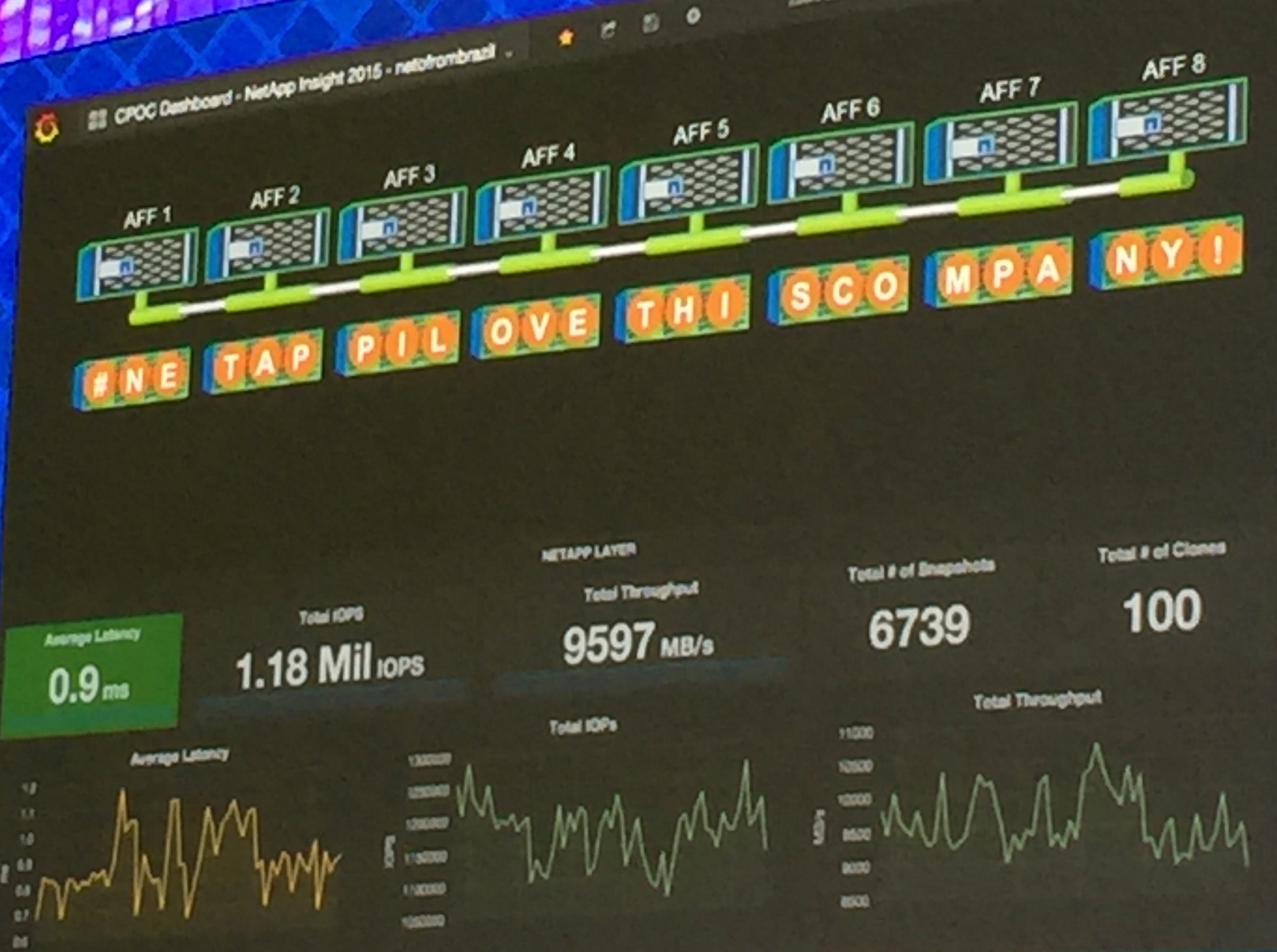
Earlier this year, NetApp announced their All Flash Array (AFA). Although many storage vendors came out with their version first, NetApp took its time to do it right. To prove it, they received outstanding results from SPC1 benchmark test, not only surpassing all of its competitors but also breaking records. So what did NetApp do to highlight this great accomplishment?!?! They made it better, faster, stronger. A demo by Neto From Brazil, demonstrated > 70% gains from previous results, achieving over 1.18M IOPS with UNDER 1ms latency with an 8-node AFF cluster. This is pretty amazing if you ask me.
Check out the demos in the video below
As always, check back later for new stuff in the IT realm…

 I started my career supporting a huge enterprise environment for all Microsoft products; however, I have not created any posts on this topic here in my blog.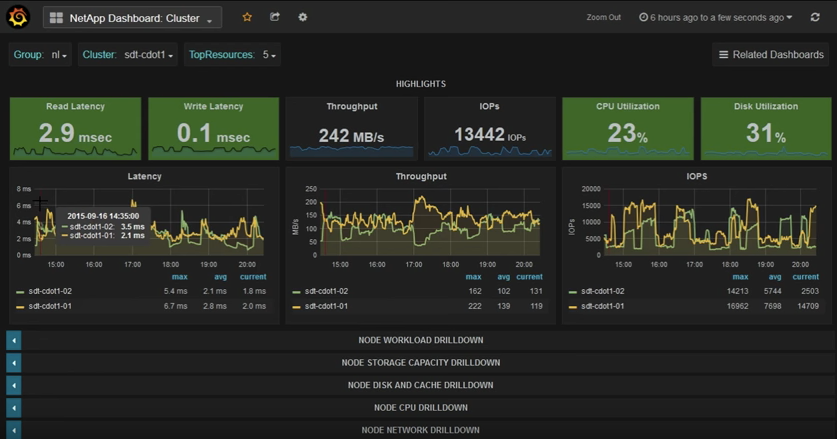



 @greatwhitetec