Golden Nuggets: #2 NetApp VSC – Provisioning

Wizard_LegoI previously wrote a post or two related to NetApp’s Virtual Storage Console for VMware vCenter, including its uses and how to install it. In this post I would like to highlight its importance in a NetApp/VMware or FlexPod environment.

NetApp’s VSC is a very handy tool that will allow you to achieve many tasks in an automated fashion rather than doing them manually; therefore, it will save you time and eliminate the possibility of human error. During the configuration and provisioning process, the human error factor can result in a lot of frustration for the admin/engineer, as troubleshooting often ends with the finding of a simple step that was missed. VSC is not a new tool, but there is a new version (6.0) that introduces new features and fixes. VVols requires VSC 6.0 , by the way.

One of the coolest features of VSC (IMHO), is the provisioning of storage from the VMware Web client. If we were to create an NFS datastore for VMware, the manual process will include the creation of a volume, granting the correct permissions for the export, and then mounting the datastore to each host. This takes quite a bit of time and requires having to jump between UIs.

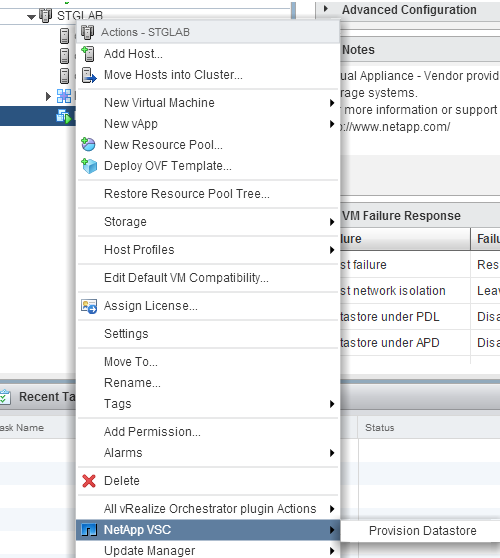
VSC allows you to do all the aforementioned steps from the VMware client (Web or C#) from one easy to use provisioning wizard. You can provision datastores, volumes, exports, and permissions by simply right-clicking the cluster or an individual host. If  you do this from the cluster level, VSC will create the volume and exports which is cool, but the coolest part is that it will also add the hosts’ IP addresses with the necessary permissions to the export, and it creates and mounts the datastores on all hosts within the cluster, NFS in this case. That alone is a good reason to have VSC, albeit there are many other tasks that VSC is capable of.

One of the frequently asked questions I see on both the VMware and NetApp communities, relates to errors and failure to mount an NFS datastore in vCenter. Often times it relates to the permissions within the exports, so VSC will do all this for you and prevent such issues.

Note: Please refer to NetApp’s Interoperability Matrix Tool (IMT) to determine which version you need. Specific versions are needed for VMware’s Web client and the same goes for the vSphere Client.
VSC_Cluster


VSC options for Cluster


VSC_Host


VSC options for Host


Get your NetApp – VVols while they are HOT

pistonToday, the long awaited NetApp VASA Provider (VP) and the new shiny VSC console have been released to general availability.

So what does VASA and VSC have to do with VVols? Everything. In previous posts I talked about both NetApp’s VSC and VASA provider for VMware here. These offerings along with VAAI provide a tight integration between VMware and NetApp. Given the transition from VMware’s C# Client (fat) to Web Client, it resulted in the need of updated versions, and this is how VSC 6.0 and VASA Provider 6.0 were born.

Now to VVols. In order to be able to deploy VVols with NetApp there are a few requirements.

  • vSphere 6.0 (or later)
  • NetApp Clustered Data ONTAP 8.2.1 or later (thanks Nick for the clarification)
  • VSC 6.0
  • NetApp VASA Provider 6.0

You can see now why this announcement is such a big deal, both VSC and VP make up the engine that powers up the VVols machine. Both vSphere and cDOT 8.2.1 have been out for a while, but those that wanted to test drive VVols with GA code could not do that until today except by using beta code.

VSC brings and additional enhancement with its new version and that is the addition of PowerShell cmdlets for most VSC features. These cmdlets along with PowerCLI and NetApp’s PowerShell Tool Kit can provide tighter integration and automation between NetApp and VMware.


You can download VSC and VP from the links below:

VSC_6.0_Download

NetApp_cDOT_VASA_Provider_6.0

cDOT Tips 101 – Web Logs

Troubleshoot

With the transition to NetApp clustered Data ONTAP from 7-mode, a lot of end users are struggling not  only with new commands to learn, but also with troubleshooting a platform that admins are not familiar  with.

The most common mistake I see from admins, specially the newbies, is the lack of research and effort put  into a problem. Often times the problem is easy to fix, but you have to go find the root cause first.

While admins still stumble through the new commands, the first thing they should be doing during a troubleshooting exercise is to look for the logs. This may be obvious to some of us, but not to all. Fortunately cDOT allows for admins to look through the logs from a web UI as long as everything is configured properly, which removes some of the intimidation from new commands.

To access the logs for a node, you first need to:

  • setup a cluster management LIF
  • configure web protocol engine (HTTP or HTTPS (need certs))
  • allow chosen protocol through the firewall, if enabled
  • setup Service Processor Infrastructure (spi)
    • you can use vserver services web show to verify if it is enabled
  • cluster user account must be enabled for http access
  • access to the spi web service must be in place for your role (access-control)

Once everything is configured properly, you can navigate to:

Note: If you selected to use HTTPS and configured/imported certificates, the path will start with https instead of http as shown above.

If asked for credentials, use the credentials for the cluster user account.

web_log

NetApp EVO:RAIL

EVO:RAIL LogoFor those not familiar with EVO:RAIL, this is a great solution from VMware that offers a hyperconverged infrastructure with easy management by leveraging software solutions such as vSphere, vCenter, VSAN and log insight. This solution seems to have the attention of many customers as deployment, and administration are greatly simplified and does not require a high level engineer to maintain the environment.

Although the announcement that NetApp would be launching a hyperconverged EVO:RAIL solution was made late last year, the product has not yet been released to the public (as far as I know). So there are a lot of questions out there. Is it FAS? Is it EVO:RAIL? or a combination? Well, the answer is both and more.

This is a NetApp integrated EVO:RAIL solution that includes both EVO and the NetApp C-DOT we currently know. This offering allows low level admins to administer VMware and NetApp from the same console via VSC. More on VSC, VASA and VAAI here. So in essence, when you get the NetApp 4RU appliance, you use a simple GUI wizard that automatically configures NetApp C-DOT and presents the storage to VMware. So this solution not only virtualizes the compute side but also the storage side.

Being that you have NetApp integrated into this solution, you are still able to use different protocols as well as SAN and NAS offerings, just like we do now with other FAS systems. This solution also includes automated back-up and recovery features, QoS, and Cloud integration by leveraging NetApp Data Fabric.


NetApp EVO:RAIL
NetApp EVO:RAIL

So, Why did NetApp decide to jump on the EVO:RAIL bandwagon???

Well, I believe that NetApp recognizes the competition with new storage vendors such as SolidFire, Tintri, and Simplivity among others, that offer all flash, high performance, easy to use hyperconverged solutions. Also NetApp recognizes the need for a solution for small and medium size businesses that do not have the luxury of hiring several IT staff to manage different areas of IT. Lastly, I believe NetApp is recognizing that in order to survive, they need diversify, as the days of shared enterprise storage may be coming to an end by the introduction of new technologies that drive costs down and simplifies administration while reducing overhead.


Uses Cases:

NetApp seems to be targeting departments and business areas for this specific solution. In my opinion EVO:RAIL (not just NetApp’s) has many other uses cases such as VDI deployments, production loads for remote offices in different geo-locations, test/dev, as well as DR source/target when combined with a Cloud offering.

I’m curious to see what the final product would be like, and how it would stand against other EVO:RAIL offerings.


VMware vROps: Monitoring Solutions for NetApp Storage

VMware’s vRealize Operations Manager is a great tool for monitoring not only your VMware environment but also the underlying components utilized by this virtualization solution. vROps has the ability to incorporate many other solutions, in order to provide what most IT departments search for; a single point to monitor the environment.

As the Software Defined Data Center (SDDC) begins to take over, it is more evident that the main components that comprise IT infrastructures include virtualization of servers and network, as well as storage. Monitoring such technologies can be cumbersome and may require many tools, unless we leverage vROps management packs. I have utilized other tools such as native vendor tools, tools that offer management packs as well, but I have not been able to find the granularity that I need to monitor a large environment, specially when it comes to graphical representation. A picture is worth a thousand words.

After installing vROps 6.0, I started to leverage its new features, but I wanted more. I searched for storage integration and luckily came across Blue Medora’s NetApp management pack for vROps. This management pack provides not only granular visibility to the storage arrays, but more importantly how those arrays, volumes, and LUNs are associated with the VMware environment. This solution also allows for the familiar vROps drill down of information in order to aid in the troubleshooting process. This and many other solutions can be found at VSX site (VMware Solutions Exchange) https://solutionexchange.vmware.com/store.

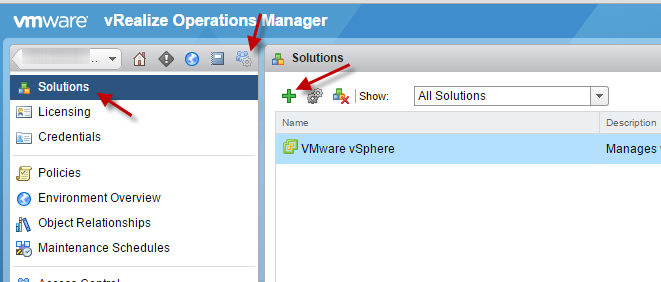
The installation of the Blue Medora pack is very simple and straight forward, as long as you meet all the requirements. The most obvious requirements include VMware’s vROps and NetApp’s OnCommand Unified Manager Core (DFM), which acts as a proxy between vROps and the NetApp arrays to obtain information. As previously mentioned, you can obtain the management pack from VSX or Blue Medora’s site for a 30 day free trial. After obtaining the pack, add this to your vROpS solutions and configure.

Solutions.

NetApp_Adapter

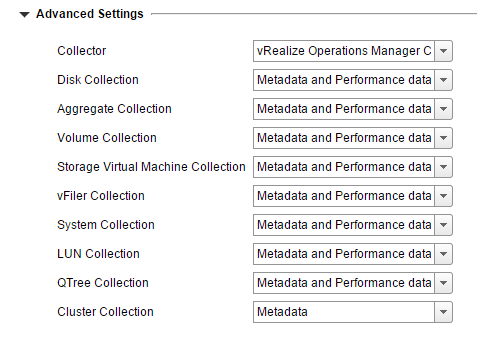
You can also tune what and how much to collect depending on the entity, by expanding the advanced settings during configuration. These settings can be changed after deployment as well.

NetApp_AdvancedSettings


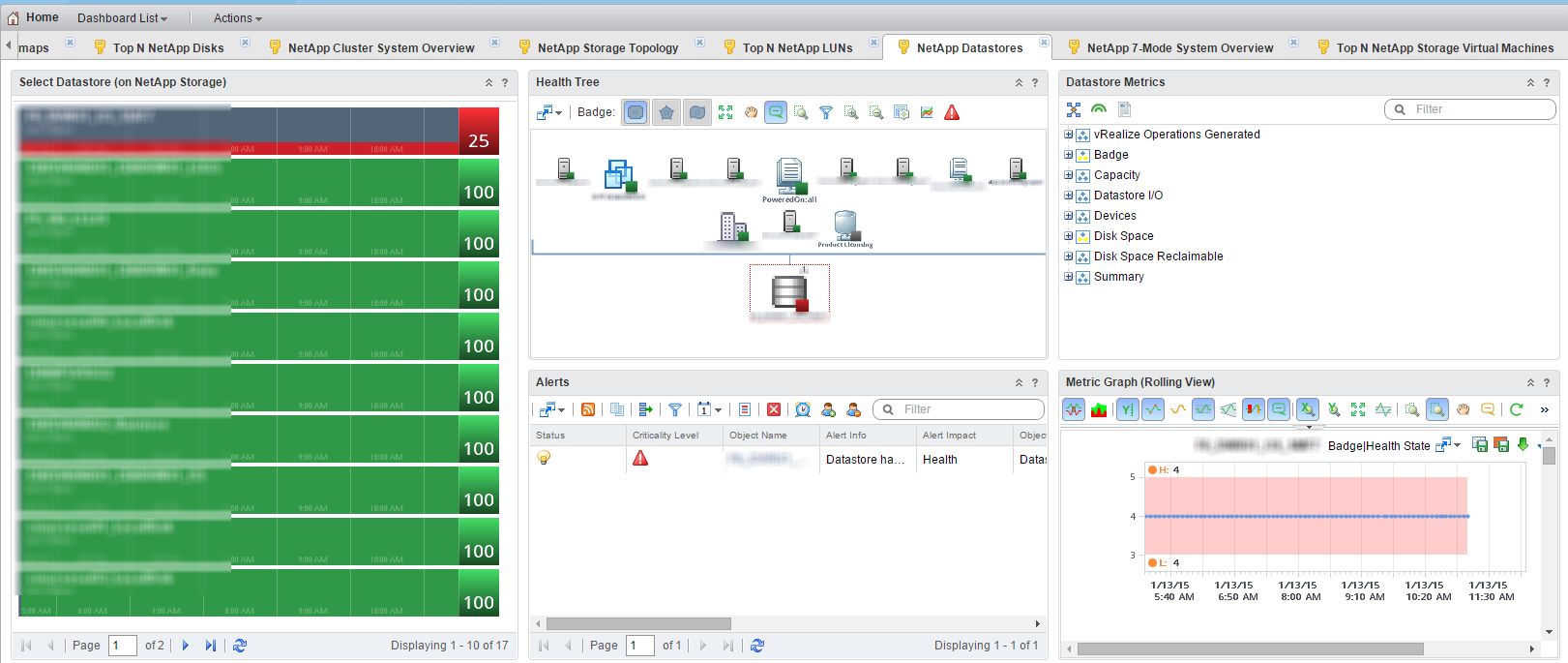
That is pretty much it. After a successful deployment, you will notice about a dozen new dashboards on vROps’ home page.

NetApp_Dashboards


NetApp_Dashboards_Sample