Deploying NetApp VASA Provider for VMware vSphere

As I mentioned in previous posts, NetApp’s VASA Provider for VMware vSphere allows for the management of storage through profiles, and gears towards the Software Defined Data Center (SDDC) approach.

In order to deploy VASA provider, you will need to download the NetApp VASA provider for vSphere from NetApp’s support site. There is an ONTAP 7-Mode flavor and also an ONTAP C-Mode flavor, so choose the one that matches your environment. Deploy the virtual appliance (OVA) using VMware’s client and provide the necessary information for the virtual appliance. You will also need VSC already installed in order to register the VASA provider after installation and configuration.

VASA_Settings

During the first boot, VMware Tools installation prompt appears. Mount the VMware Tools and hit enter to install VMware tools and continue installation. Change the CD/DVD configuration on the virtual appliance to “Client Device”. Provide passwords for maintenance account (maint) and vpserver account when prompted. Use the vpserver account to register VASA with VSC from the VSC configuration page by providing the IP address of the VASA provider.

VASA_Tools   VASA_Tools2

Configuration settings will appear after installation. Use the Web UI for normal use and the maintenance console (CLI) when the Web UI is not accessible. Note that the Web Console utilizes port 9083, so make sure to enter the correct TCP/IP socket when using the WEB UI.
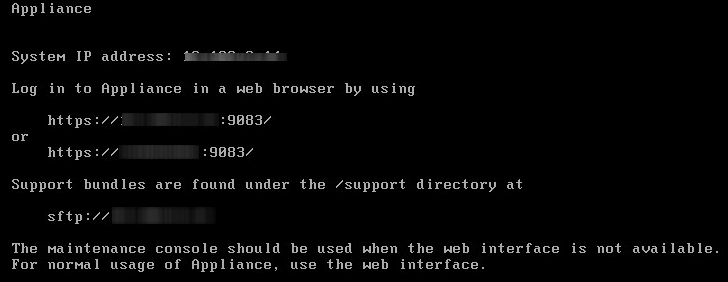
VASA_Config

At this point, VASA has been deployed and configured. All that is left to do is register the VASA Provider with vSphere via VSC, and enjoy the benefits of NetApp and VMware integration.

VASA_Registration


Storage Virtualization: Yep, NetApp

Just as VMware has been the pioneer for server virtualization, NetApp seems to be the virtualization player to beat in the realm of storage at this moment. Although NetApp’s ONTAP Cluster Mode (C-Mode) is not a new release, it is taking some of the legacy, 7-mode users some time to not only understand, but also implement C-Mode given its complexity compared to 7-mode. But an easy way to think of C-Mode, is to find the similarities with VMware’s vSphere.

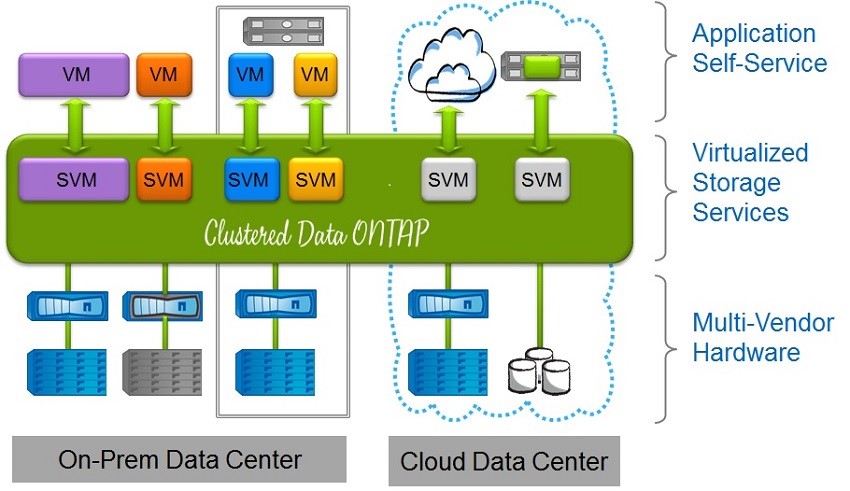
Cluster mode breaks apart the physical aspect of the storage into a virtualized setup where several virtual storage environments can be created to segregate the diverse logical configurations. C-Mode can be a great use case for a public cloud service provider where the segregation of storage virtual machines is necessary; but let’s keep in mind, that this kind of segregation can also be heavily utilized within a private environment for many use cases.

Having recently achieved a master’s degree in Cyber-security and Information Assurance (CIA), I learned a few things about securing not only public environments, but also making sure we are internally secure. Your company is only as strong as its weakest link. After all, a great number of the attacks are generated internally by users with lack of knowledge or even malicious users. Through storage virtualization and the segregation of storage virtual machines, we can achieve not only better security but also better management through the use of policies.

NetApp_Stor_Virt


This virtualized storage environment allows for a more direct relationship with virtualized server environments such as VMware, where more granular control is needed. In my humble opinion, NetApp C-Mode and VMware vSphere are not that much different from each other. As I was preparing for my NCDA certification for NetApp (C- Mode), I couldn’t help but notice the similarities in their architectures. C-Mode acts as the Hypervisor, or in this case vSphere, and both platforms have virtual machines that act as independent identities. Such identities have their own personalities such as IP addresses, login information, mappings to a physical underlying network, etc.

While VMware uses servers for the physical platform, NetApp C-Mode uses their hardware and data ONTAP software to deliver storage virtualization; that once joined with VMware, become an extremely powerful solution for businesses of all sizes. Clearly, I am drinking the NetApp cool-aid, but I believe their technology in addition to VMware’s products make up for great SMB, and enterprise solutions. The two companies provide even better integrations and solutions through the use of VASA, VAAI, VVols, VSC, etc. More on them soon…


DTv6

Not your next Internet protocol…

For those of us that like to test our knowledge with certifications, I got good news (or bad news, depending on how you look at it). VMware has released a new End User Computing certification for VMware Horizon View. This certification will validate your skills and experience with Horizon View.

The previous version (VCP5-DT), has not been deprecated as of now.

More information on VCP6-DT as well as blueprint info can be found here.

VCP6-DT

VSA – EOL (VSAN Part 1)

Good Bye, VSA

As some of you may know, VMware VSA has gone end of life as of April, 2014. This applies to all flavors of VMware’s vSphere Storage Appliance. This does not mean that you have to stop using VSA… at least not immediately.

As long as you have an active support contract for VMware’s VSA, you are still entitled to contact support regarding any issues. However, you can no longer purchase VSA. So what exactly do this mean for those of us that have VSA in our environments? Now what?

While there is no replacement per se, there is however a better alternative. Yes, I said better. VMware engineers took the concept of VSA and created a much more robust solution. The new and improved solution is called VSAN or Virtual SAN. I am not saying by any means that VSAN is built on VSA code, I am saying that they share common use cases and solutions. Last I heard, VMware was coming up with a SKU for VSA to VSAN upgrade (I’m checking my sources).

VSAN is VMware’s software-design storage solution that allows for the use of local storage and leverages such storage not only for capacity purposes, but also for performance gains. VSAN caches reads/writes by utilizing server-side flash. There are tons of documents about VSAN and their use cases. I have included a few links from other blogs about VSAN.

So, while there is no direct/in-place upgrade available, there is a way to take your existing hardware, as long as your hardware meets the VSAN Hardware requirements, and transform it into your new VSAN solution. I’m in the process of doing this myself right now, so I will post steps as I go through this process.


In the meantime, you may want to check these links out:


To be continued…